
Download AI Interior – AI‑Generated Interior Design Tool, Free, Secure & Easy
Overview
AI Interior Pro is a cloud‑based, browser‑only design platform that leverages generative‑AI to create instant interior‑design visualisations for both residential and commercial spaces. The service is built around a simple three‑step workflow: upload a photo of the room you want to redesign, pick a design style from a curated library, and let the AI generate a high‑quality before‑and‑after mock‑up. Because the heavy lifting happens on remote servers, users enjoy a lightning‑fast experience without the need for powerful GPUs, large‑capacity SSDs, or any local installation.
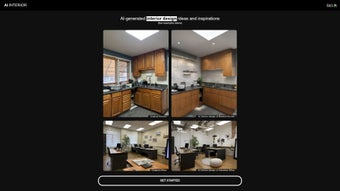
The interface is deliberately minimalist: a left‑hand panel houses the upload button, style selector, and a few adjustment sliders, while the right side displays the original photo beside the AI‑crafted redesign. This visual side‑by‑side comparison makes it easy for homeowners, interior designers, real‑estate agents, and even coffee‑shop owners to evaluate the impact of colour palettes, lighting schemes, furniture arrangements, and decorative accents in a matter of seconds.
The platform supports a broad spectrum of design aesthetics, ranging from sleek modern and warm contemporary to minimalist, tropical, Japanese, and emerging trend‑focused styles such as biophilic or maximalist.
Each style comes with pre‑selected colour palettes, texture recommendations, and furniture suggestions that align with the underlying design principles. Users can further fine‑tune the results using intuitive sliders that control brightness, contrast, and furniture density, or swap individual items from an extensive library of curated pieces. All generated assets are rendered at up to 4K resolution, making them suitable for client presentations, marketing collateral, or personal mood boards.
AI Interior Pro offers a generous free tier that allows unlimited basic renders, while a premium subscription unlocks unlimited 4K exports, batch processing, priority queue access, and commercial‑use rights. Security is a core pillar: all images travel over HTTPS, are encrypted at rest, and are automatically purged after 24 hours unless the user explicitly saves the project to their personal dashboard. By removing the barriers of cost, complexity, and steep learning curves associated with traditional CAD tools, AI Interior Pro democratizes high‑end interior visualisation, empowering anyone with a creative idea to see it realised instantly.
Key Features of AI Interior Pro
- AI‑Generated Before & After Visuals: Upload any room photo and receive instant side‑by‑side renderings that showcase a complete design makeover, complete with lighting and colour adjustments.
- Extensive Style Library: Choose from modern, contemporary, minimalist, tropical, Japanese, biophilic, maximalist, and more, each with curated colour palettes, material suggestions, and furniture collections.
- Smart Colour & Lighting Engine: The AI analyses existing illumination, window placement, and colour temperature, then proposes optimal lighting fixtures and hue combinations tailored to the selected style.
- Furniture Arrangement Optimisation: Spatial‑flow algorithms evaluate room dimensions, traffic patterns, and ergonomic standards to suggest furniture layouts that maximise comfort and aesthetic appeal.
- High‑Resolution Export Options: Download renders in 1080p for casual use or 4K Ultra‑HD for professional presentations, marketing assets, or large‑format prints.
- Free Tier with Generous Limits: Unlimited basic renders, community‑driven style packs, and the ability to share projects via temporary URLs without any cost.
- Premium Subscription Benefits: Unlimited 4K exports, batch processing of multiple rooms, priority AI queue, commercial‑use licensing, and early access to new style packs.
- Cross‑Platform Web Access: Fully functional on Windows, macOS, Linux, Android, and iOS browsers – no dedicated app required, ensuring a consistent experience across devices.
- Secure Cloud Processing: Images are encrypted during upload and stored only temporarily; personal data is never sold or shared with third parties.
- Collaboration & Sharing Tools: Generate shareable links that allow teammates or clients to view, comment, and suggest tweaks in real time, streamlining the feedback loop.
- Continuous AI Model Updates: Monthly improvements to the generative model, new style packs, and UI refinements are delivered automatically, keeping the platform at the cutting edge.
Installation, Compatibility & How to Use AI Interior Pro
Getting Started – No Download Required
AI Interior Pro is a pure web application, so there is nothing to install on your computer or mobile device. Simply open a modern browser (Chrome, Edge, Firefox, or Safari) and navigate to www.aiinteriorpro.com. First‑time visitors are prompted to create a free account or continue as a guest. An account unlocks project saving, premium features, and collaboration tools, but the core functionality works perfectly without signing up.
System Requirements (Windows 10/11, macOS 10.15+, Linux, Android 8+, iOS 13+)
Because rendering occurs in the cloud, local hardware requirements are minimal. For the best experience we recommend:
- Browser: Latest version of Chrome, Edge, Firefox, or Safari with JavaScript enabled.
- Internet: Minimum 5 Mbps download/upload for standard renders; 10 Mbps+ for 4K exports.
- Screen resolution: 1280 × 720 or higher for optimal UI layout.
Step‑by‑Step Usage Guide
- Upload Your Space: Click “Upload Photo,” select a clear image of the room, and let the AI analyse it (typically 5‑10 seconds).
- Select a Design Style: Browse the style gallery on the right‑hand panel. Hover over each style for a brief description and sample colour palette.
- Generate the Design: Press “Generate.” Within 15‑30 seconds the split view appears, showing the original on the left and the AI‑crafted redesign on the right.
- Fine‑Tune (Optional): Use sliders to adjust brightness, contrast, or furniture density. Click individual pieces to swap them with alternatives from the curated library.
- Export or Share: Click “Download” to save a high‑resolution PNG/JPEG, or “Share” to create a temporary link for collaborators.
- Save to Dashboard: If logged in, hit “Save Project” to store the render for future edits or version comparisons.
Troubleshooting Common Issues
If renders take longer than expected, verify your internet connection and ensure your browser is up‑to‑date. Clearing the cache or switching browsers often resolves latency problems. Dark or low‑resolution source photos can impede the AI’s ability to recognise architectural features; uploading a well‑lit, high‑resolution image yields the best results. For persistent issues, the support portal offers a live chat and a knowledge base with step‑by‑step guides.
Pros, Cons, FAQ & Final Verdict
Pros
- Instant, high‑quality before‑and‑after visualisations with minimal effort.
- No software download or heavy hardware requirements; works entirely in the browser.
- Broad range of design styles suitable for residential, commercial, and hospitality projects.
- Secure, encrypted cloud processing protects user privacy and data.
- Generous free tier with unlimited basic renders.
- Collaboration‑friendly sharing links and dashboard saves streamline feedback.
- Monthly AI model updates keep the platform cutting‑edge.
Cons
- Requires a stable internet connection; offline use is not possible.
- Premium features such as 4K export, batch processing, and commercial‑use rights require a subscription.
- AI may occasionally suggest furniture that does not perfectly match exact room dimensions.
- Customization beyond the provided style palettes is limited in the free version.
- Complex architectural spaces with many structural elements may need additional manual tweaking.
Frequently Asked Questions
Can I use AI Interior Pro for commercial projects?
Yes. The platform is designed for both personal homeowners and businesses such as coffee shops, boutique hotels, and coworking spaces. The premium subscription includes commercial‑use rights and higher‑resolution exports suitable for client presentations.
How does AI Interior Pro protect my uploaded photos?
All images are transmitted over HTTPS and encrypted at rest. By default, photos are stored for only 24 hours unless you actively save the project to your dashboard. We never sell or share your images with third parties.
Do I need any design experience to get good results?
No. The AI handles colour theory, lighting, and spatial planning automatically. You simply choose a style you like, and the tool generates a polished concept. Designers can still use the fine‑tuning options to add a personal touch.
What browsers are officially supported?
The latest versions of Chrome, Edge, Firefox, and Safari are fully supported. Older browsers may experience slower render times or UI glitches.
Is there a trial period for the premium subscription?
Yes. New users receive a 7‑day free trial of the premium tier, giving access to unlimited 4K renders, batch processing, and priority AI queues. No credit card is required to start the trial.
Final Verdict & Call to Action
AI Interior Pro bridges the gap between high‑end interior‑design software and casual DIY inspiration. Its AI‑driven engine produces professional‑grade visualisations in seconds, making it an invaluable tool for anyone who wants to experiment with style without the steep learning curve of traditional CAD programs. While the dependence on an internet connection and the optional subscription for advanced features may be limiting for some power users, the free tier already delivers impressive results that can spark creativity and guide real‑world purchases. Whether you are a homeowner looking for fresh ideas, a small business needing quick visual concepts, or a design student seeking rapid prototyping, AI Interior Pro offers a secure, user‑friendly, and cost‑effective solution. Click the button below to start your free trial and watch your living spaces transform with just a few clicks.



.png)



